
Help

Clients, time and documents

Your clients, the hours you work for them and the files you send with quotes and invoices.

On this page
  1. Clients
  2. A client's page
  3. Timesheet
  4. Documents

Clients

The Clients page lists everyone you invoice, with a search. New client takes a Name * and Email *, plus an optional Contact person, ABN (with Find ABN to search the register by name), Address, Payment terms (days) and Hourly rate. Choose Create client.

Import brings in a CSV of clients and matches its columns for you; Download a template shows the layout.

Each row's menu has Edit, Statement and Delete. A client with invoices, quotes, expenses or recurring templates can't be deleted.

Statement opens a Statement of account: Outstanding, or Activity between two dates, to Download PDF or Email to client. Customer statements come with Standard and Pro.
Plans with it: every plan (Free, Standard and Pro).

Plans with automatic payment reminders, late fees and customer statements: Standard and Pro.

A client's page

A client's page shows their details (change them and choose Save changes), their invoices with New invoice, and the documents filed against them with Upload document. Under the name it says how many invoices they have, what you've billed them this financial year and, once two or more are paid in full, how many days they usually take to pay.

Statement makes a statement of account, and Delete client removes a client with nothing linked to them.

Plans with it: every plan (Free, Standard and Pro).

Plans with documents: Standard and Pro.

Timesheet

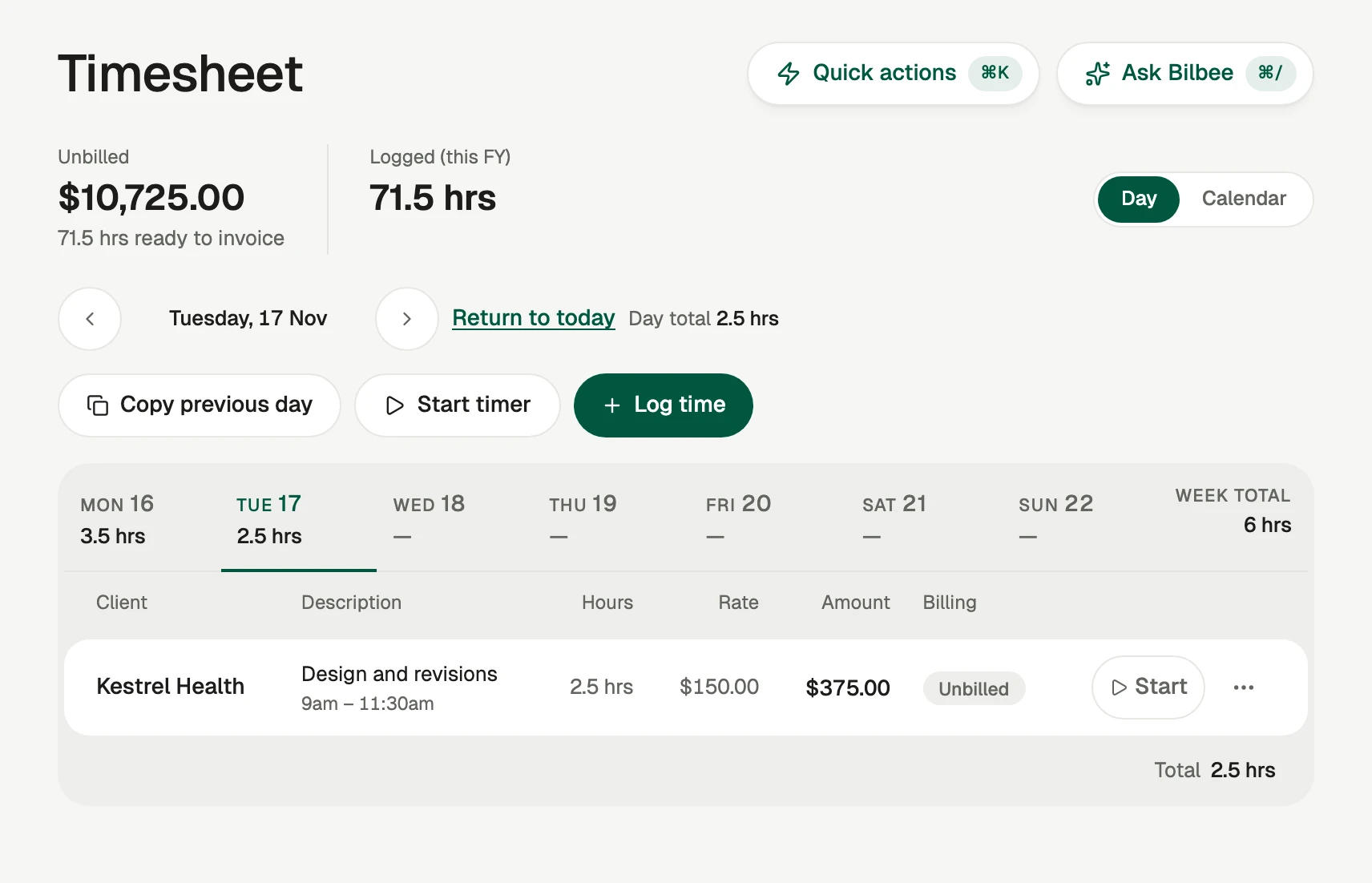
The Timesheet records the hours you work for each client at an hourly rate. Unbilled totals the time not yet on an invoice, and Logged (this FY) the hours this financial year. Switch between Day and Calendar views.

The Timesheet's day view: unbilled hours and their value, a strip of the week's days with hours logged, and the day's entry with its client, hours, rate and amount.

Start timer runs a timer against a client until you choose Stop, even if you close the app; stopping opens the entry for you to check before it's logged. Log time enters hours directly: Date, Client, Description, an optional Start time and End time, Hours and Hourly rate. In Day view, Copy previous day copies an earlier day's entries, unbilled.

Click an entry to edit or delete it. Time already on an invoice can be deleted but not edited.

To bill it, create an invoice for the client: the builder says how much unbilled time they have and adds it, one line per entry. When you send, Timesheet attaches a PDF of the time billed.

On a plan without time tracking, the page explains it instead. Time tracking comes with Standard and Pro. Time logged before a plan change stays, and you can still edit or delete it.

Plans with time tracking: Standard and Pro.

Documents

Documents keeps contracts, proposals, job photos and other files, ready to send with a quote or invoice. Upload document takes a PDF, Word, Excel, PowerPoint or image file, with a Name, a Type and, if it belongs to one, a Client.

Send with new invoices and Send with new quotes tick it for you when you send, and you can untick it each time. Each row's menu has Download, Edit details, and Delete, which becomes Remove from library once the file has been sent to a client.

Documents come with Standard and Pro. After a plan change, files you stored stay viewable and only adding stops.

Plans with documents: Standard and Pro.

Document storage: none on Free; 500 MB on Standard; 5 GB on Pro.

Less admin. More time for your business.

Add your business details, send an invoice, record an expense. The estimate does the rest.

Start free

Free to start: five invoices a month, no card.